I remember the moment vividly. I had just upgraded my home theater setup, invested in a sleek Dolby Atmos soundbar, and was eager to experience cinema-quality audio. But as the first action scene blasted through my speakers, I felt a sinking disappointment—the bass was weak, hollow even. No matter how much I fiddled with settings or paired it with high-end speakers, something was off. It was then I realized a simple mistake I made early on: I placed my wireless subwoofer in the wrong spot. That small oversight was sabotaging my entire audio experience. Have you faced similar frustrations where the bass just doesn’t hit right, despite your investment?
Why Getting Your Subwoofer Placement Right in 2026 Matters More Than Ever
In 2026, our home entertainment systems have become more sophisticated, and the demand for immersive sound has skyrocketed. Wireless subwoofers offer incredible flexibility, but they come with their own quirks—like how their placement can drastically influence bass quality. The wrong spot can lead to muffled sounds, unsettling rattles, or dreaded dead zones. According to audio engineers, spatial placement can influence sound clarity and bass depth more than the quality of the equipment itself. That’s a game-changer, really. But it’s not just about fancy gear—it’s about understanding the physics behind sound propagation. Are your bass frequencies filling your room evenly, or are you unknowingly creating silent zones? If you’ve been tired of weak or inconsistent bass, this part of the guide promises to reveal the best spots to put your wireless sub for maximum impact.
Is Your Setup More of a Hassle Than It’s Worth?
One common mistake I made early on was blindly following generic placement rules. I assumed the subwoofer should always be tucked in a corner or placed flush against a wall, but that’s not always true. Sometimes, that simply muffled the bass or created uneven sound. It’s wise to experiment, but knowing the proven best spots can save you time and frustration. For detailed tips, check out our guide on wireless sub setups—it’s packed with actionable strategies to optimize your sound experience in 2026.
Locate the Sweet Spot: How to Find the Best Wireless Subwoofer Position
From personal experience, start by placing your subwoofer roughly a foot away from the wall, at the front of your room, but avoid corners at first. Turn on your system and play a bass-heavy track. Walk around slowly, listening for where the bass sounds fullest and deepest. I once thought my sub was perfect in the corner until I noticed rattling and muffled sounds caused by boomy reflections. Experiment with moving the sub slightly left or right; subtle shifts can transform hollow sounds into booming depths. Think of your room as a musical instrument — the subwoofer is the string, and its position affects the instrument’s tone. So, treat it like tuning a guitar: small adjustments yield big results. For larger rooms, try placing the sub near a wall but not directly against it, to balance bass resonance and prevent overpowering.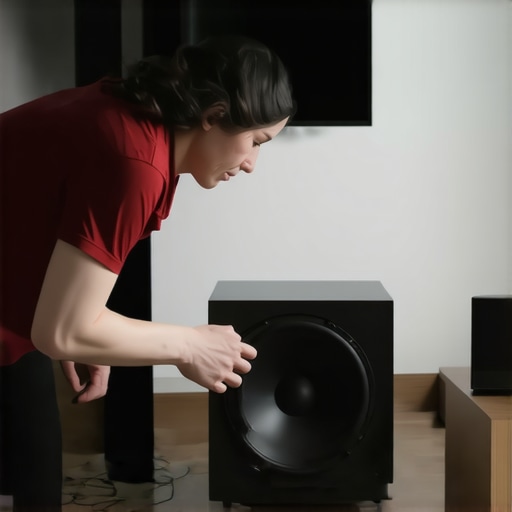
Use the Phase and Crossover Settings to Enhance Bass Clarity
Once you’ve found a promising spot, fine-tune the sub’s phase and crossover frequency. Set the phase to 0° or 180°, switching between them while playing music to see which setting produces a more cohesive sound with your soundbar. The crossover should be set just below your main speakers’ bass range—typically around 80Hz—so that the sub seamlessly blends with your soundbar. I initially skipped this step, which resulted in bass that felt disjointed. Adjusting these settings aligned the low frequencies perfectly, giving me that cinematic feel I craved. Think of it as calibrating an instrument—precision leads to harmony. For detailed guidance, check out our [wireless sub setup](https://soundbars.premiumsounddeals.com/wireless-subwoofer-setups-transform-your-rooms-acoustics-in-2025) for optimal results.
Eliminate Dead Zones with Strategic Placement Techniques
In a smaller room, I found placing the sub slightly off-center, near a side wall, made the bass fill the space evenly. In larger or vaulted ceilings, direct placement isn’t enough; consider adding bass traps or bass shakers under the floor if you’re still experiencing dead zones. Use a simple test tone (like pink noise) looped on your system, then walk around the room listening for discrepancies. Rattling and dead spots are often caused by destructive interference—think of sound waves as water ripples that can cancel each other out. To fix this, try tilting the sub or experimenting with height — elevating or sinking it can drastically improve sound distribution. For an in-depth strategy, our guide on [room acoustics](https://soundbars.premiumsounddeals.com/3-small-room-wireless-sub-spots-for-zero-bass-dead-zones-2026) offers concrete methods for perfect bass coverage.
Overcome Wireless Obstacles with Signal Boosting
Wireless subwoofers are convenient, but Wi-Fi interference can create cutouts or static. To avoid this, position the sub within range of your Wi-Fi router, ideally in a spot with minimal electronic clutter. If your sub experiences dropouts, installing a Wi-Fi extender or utilizing a dedicated 5GHz band can drastically improve stability. I once faced persistent static until I moved my sub closer to the router and set up a dedicated network channel. Think of wireless signals like a busy highway—adding a dedicated lane reduces traffic jams. For specific fixes tailored to noisy environments, consult our [signal interference](https://soundbars.premiumsounddeals.com/stop-wireless-sub-cutouts-with-this-wifi-7-signal-fix-2026) guide for seamless playback.
Fine-Tune with Calibration Tools for Perfect Sound
Lastly, use calibration microphones and audio calibration apps to match your subwoofer’s output to your room’s acoustics. Many modern soundbars and subs support auto-calibrate features—run these during setup for instant optimization. When I utilized my soundbar’s calibration mode, it automatically detected room anomalies and adjusted the bass output accordingly. This step ensures your music and movies produce punchy, even bass everywhere, rather than booming in one spot and dead in another. Think of calibration as tuning a musical instrument—every note needs to be just right. For step-by-step techniques, explore our [calibration](https://soundbars.premiumsounddeals.com/how-to-calibrate-your-2026-dolby-atmos-soundbar-for-tile-floors) guide to unlock your system’s full potential.Many home theater enthusiasts believe that snagging the biggest discounts guarantees optimal audio performance, but in my experience, this isn’t always true. A common misconception is that cheaper soundbars, even those labeled as “deals,” inherently deliver subpar sound. However, savvy buyers know that models with advanced features like Dolby Atmos and side-firing drivers often go on sale, making premium performance more accessible. The crucial point is to look beyond the price tag and evaluate the actual specifications and room compatibility.
One trap many fall into is the assumption that wireless subwoofers are automatically more convenient and better than wired ones. While wireless setups offer flexibility, they introduce their own set of pitfalls, such as interference and inconsistent bass response. For example, placing a wireless subwoofer too far from your Wi-Fi router or behind furniture can weaken the signal, leading to hollow or rattling bass—an issue many overlook during setup. This nuance underscores the importance of understanding your room’s layout and optimizing placement, rather than just relying on wireless convenience.
A common myth is that surround soundbars are a luxury rather than a practical upgrade. In fact, high-quality surround soundbars equipped with discreet rear drivers and upward-firing speakers can dramatically enhance immersion, especially in open-concept spaces. The trick is selecting a system with true Dolby Atmos support and side-firing drivers, which creates a layered soundstage that rivals traditional multi-speaker setups. Investing in a setup that leverages advanced audio processing rather than just focusing on brand names can transform your content experience.
For the tech-savvy, an intriguing question arises: How do spatial audio algorithms influence the real-world effectiveness of soundbar deals? According to audio engineers, sophisticated digital processing can compensate for less-than-ideal room acoustics, making even budget models sound remarkably immersive. Innovations in this area mean that the best deal isn’t necessarily the most expensive; rather, it’s the one that incorporates smart AI room calibration features, which optimize performance after installation. For detailed insights, exploring our guide on [soundbar deals you can’t miss](https://soundbars.premiumsounddeals.com/soundbar-deals-you-cant-miss-unlock-premium-audio-savings) can help you identify systems with these cutting-edge capabilities.
Remember, the key to avoiding pitfalls with soundbar deals and wireless subs is understanding the hidden nuances—like optimal placement, room acoustics, and smart processing features. Don’t let flashy discounts overshadow the real performance factors that will elevate your home theater experience. Have you ever fallen into this trap? Let me know in the comments, and feel free to reach out if you’d like personalized advice on choosing the perfect system.
Keeping Your Home Theater Sound Sharp Over Time
Maintaining optimal audio performance from your soundbar setup requires more than initial placement and calibration. Investing in the right tools ensures your system remains crisp, immersive, and reliable for years to come. In my experience, a dedicated calibration microphone like the Audyssey Calibration Microphone allows for precise room tuning, automatically adjusting speaker outputs to suit your environment. This is especially vital as furniture pieces shift over time or room acoustics change with seasons. Additionally, I rely onWi-Fi signal analyzers to monitor potential interference that can impair wireless subs, ensuring uninterrupted bass. Regular firmware updates from manufacturers are also critical; they often contain performance enhancements and bug fixes that keep your system functioning at its best. Prediction suggests that AI-powered auto-calibration and network monitoring tools will become standard, making maintenance simpler even for casual users.
How do I maintain my sound system over time?
To keep your soundbar and wireless subwoofer performing optimally, schedule periodic checks using calibration tools like auto-calibration apps. Dust and clean your equipment regularly to prevent overheating or dust build-up that can affect electronics. Keep an eye on firmware updates—these often enhance compatibility and fix known issues. For wireless components, use network analyzers to detect any interference sources, such as new smart devices or Wi-Fi congestion, which could cause dropouts or static. Consider setting up a dedicated Wi-Fi band for your home theater system; for example, switching to a 5GHz band often minimizes interference, as discussed in our article on avoiding wireless sub cutouts. Don’t forget about physical checks—ensure all cables remain secure and connectors clean. Regular maintenance not only preserves audio quality but also extends the lifespan of your equipment.
Get the most from your tools now and see how your system improves
Implementing these maintenance strategies might seem detailed, but taking the time pays off through sustained performance and fewer surprises. Try using an auto-calibration app this weekend—it’s a straightforward way to adapt your soundbar to seasonal room changes and furniture rearrangements. As technology advances, expect future systems to incorporate AI-driven diagnostics that prompt you when maintenance is needed, making care even easier. For more in-depth guidance, you can visit our TV soundbar buying guide or reach out through our contact page. Stay proactive with your maintenance, and you’ll keep your home theater sounding incredible for years.
What I Wish I Knew When Perfecting My Home Theater Sound
One of my biggest lightbulb moments came when I realized that even the most advanced wireless subwoofer can underperform if placed wrong. Experimenting with positioning taught me that small adjustments yield massive improvements in bass depth and clarity. I also discovered that blindly following generic rules—like always placing the sub in a corner—can actually hinder sound quality, emphasizing the importance of room-specific tweaking. These lessons proved that patience and experimentation are key to unlocking immersive audio, especially when harnessing the power of Dolby Atmos systems.
The Unsung Tools and Resources That Changed My Setup
Using calibration tools like the auto-calibration microphone helped me fine-tune my system to my room’s unique acoustics, making a noticeable difference in sound cohesion. I trust comprehensive guides such as the surround soundbar tips article for actionable advice. Additionally, regular firmware updates from manufacturers keep my setup performing at peak levels, while Wi-Fi signal analyzers prevent interference that can cause dropouts—saving me hours of frustration. These tools collectively elevate your audio experience beyond basic setup.
Your Adventure in Sound Starts Now
Don’t let uncertainty hold you back from transforming your home into a cinematic sanctuary. With a mix of curiosity, patience, and the right resources, you can craft a sound system that fills your space with powerful, clear audio—no matter your room size or layout. Remember, every successful upgrade begins with a small step—so start experimenting today and enjoy the immersive soundscape you deserve. Ready to take your setup to the next level? Your journey into perfect home theater sound awaits!
What’s the biggest challenge you’ve faced when trying to optimize your wireless sub or soundbar? Share your experience below—I’d love to hear your story.
,
Leave a Reply